|
Convert FLAC to MP3
|
Total Audio MP3 Converter converts FLAC files to MP3 format easily and quickly.
The software also supports more than 150 audio and video files and batch conversion.
- Free Download Total Audio MP3 Converter
- Install the Program by Step-by-step Instructions
- Launch Total Audio MP3 Converter by Clicking Start -> All Programs
-> Total Audio MP3 Converter -> Total Audio MP3 Converter
- Choose FLAC Files
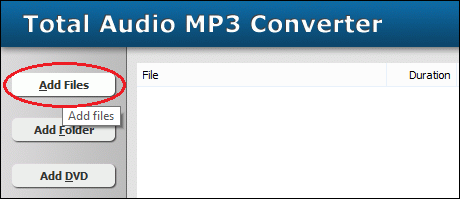
Click "Add Files" button to choose FLAC files and add them
to conversion list.
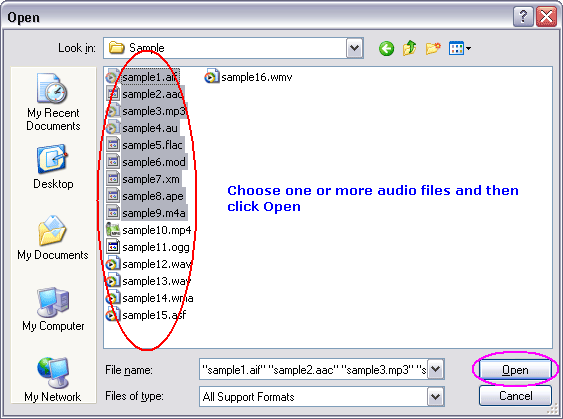
Choose one or more FLAC files you want to convert.
- Choose Target File Format
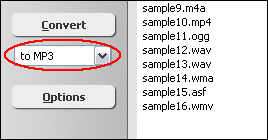
Choose "to MP3"
- Convert FLAC to MP3
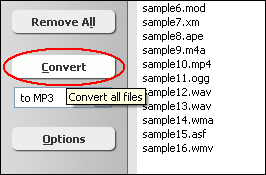
Click "Convert" to convert all FLAC files into MP3 format.
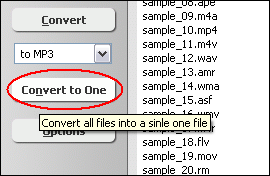
You can also click "Convert to One" to convert and combine/join/merge
all FLAC files to one MP3.
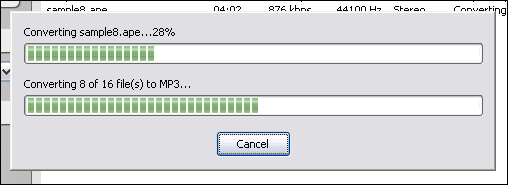
The software is converting FLAC files into MP3 format.
- Play & Browse
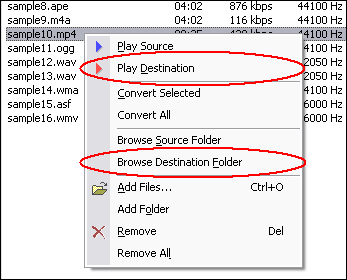
Right-click converted item and choose "Play Destination" to play
the destination file, choose "Browse Destination Folder" to open
Windows Explorer to browse the destination file.
- Done
Top
What is FLAC?
Free Lossless Audio Codec (FLAC) is a file format for lossless audio data compression.
Being lossless, FLAC does not remove information from the audio stream, as lossy
compression formats such as MP3, AAC, and Vorbis do. FLAC's primary author is
Josh Coalson. FLAC reduces bandwidth and storage requirements without sacrificing
the integrity of the audio source. A digital audio recording (such as a CD track)
encoded to FLAC can be decompressed into an identical copy of the audio data.
Audio sources encoded to FLAC are typically reduced in size 40 to 50 percent (46%
according to their own comparison). FLAC is suitable for everyday audio playback
and archival, with support for tagging, cover art and fast seeking. FLAC's free
and open source royalty-free nature makes it well-supported by many software applications,
but FLAC playback support in portable audio devices and dedicated audio systems
is limited at this time.
What is MP3?
MPEG-1 Audio Layer 3, more commonly referred to as MP3, is a digital audio encoding
format using a form of lossy data compression. It is a common audio format for
consumer audio storage, as well as a de facto standard encoding for the transfer
and playback of music on digital audio players. MP3's use of a lossy compression
algorithm is designed to greatly reduce the amount of data required to represent
the audio recording and still sound like a faithful reproduction of the original
uncompressed audio for most listeners, but is not considered high fidelity audio
by audiophiles. An MP3 file that is created using the mid-range bit rate setting
of 128 kbit/s will result in a file that is typically about 1/10th the size of
the CD file created from the original audio source. An MP3 file can also be constructed
at higher or lower bit rates, with higher or lower resulting quality. The compression
works by reducing accuracy of certain parts of sound that are deemed beyond the
auditory resolution ability of most people. This method is commonly referred to
as perceptual coding. It internally provides a representation of sound within
a short term time/frequency analysis window, by using psychoacoustic models to
discard or reduce precision of components less audible to human hearing, and recording
the remaining information in an efficient manner. This is relatively similar to
the principles used by JPEG, an image compression format.
Convert FLAC to MP3 Related Topics:
ADX to MP3,
AMR to MP3,
APE to MP3,
FLAC to MP3,
IT to MP3,
M4A to MP3,
OGG to MP3,
S3M to MP3,
SND to MP3,
DTS to MP3,
DVD to MP3,
MKV to MP3,
3G2 to MP3,
3GP2 to MP3,
3GPP to MP3,
ALAC to MP3,
DAT to MP3,
DVR-MS to MP3,
DV to MP3,
EVOB to MP3,
EVO to MP3,
M2V to MP3,
M4B to MP3,
MIDI to MP3,
MKA to MP3,
MP1 to MP3,
NSV to MP3,
NUT to MP3,
OGM to MP3,
VOC to MP3
|