|
Convert AC3 to MP3
|
Total Audio MP3 Converter converts AC3 files to MP3 format easily and quickly.
The software also supports more than 150 audio and video files and batch conversion.
- Free Download Total Audio MP3 Converter
- Install the Program by Step-by-step Instructions
- Launch Total Audio MP3 Converter by Clicking Start -> All Programs
-> Total Audio MP3 Converter -> Total Audio MP3 Converter
- Choose AC3 Files
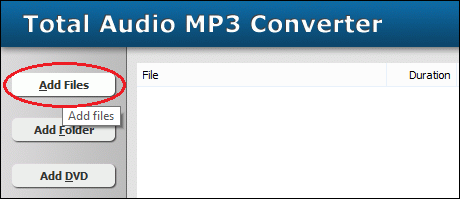
Click "Add Files" button to choose AC3 files and add them
to conversion list.
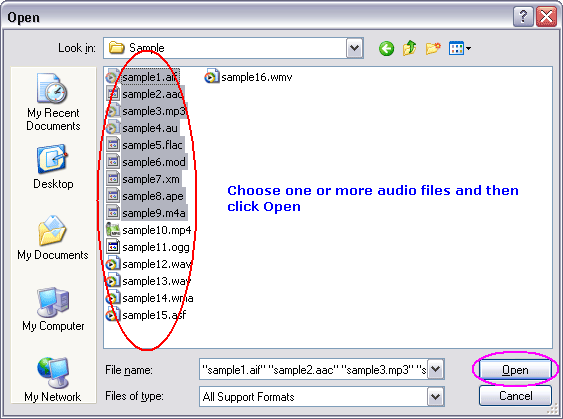
Choose one or more AC3 files you want to convert.
- Choose Target File Format
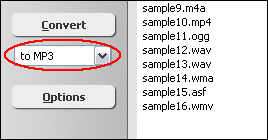
Choose "to MP3"
- Convert AC3 to MP3
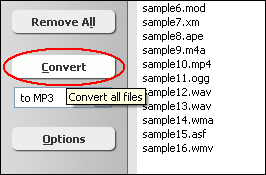
Click "Convert" to convert all AC3 files into MP3 format.
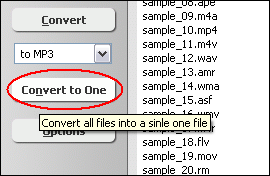
You can also click "Convert to One" to convert and combine/join/merge
all AC3 files to one MP3.
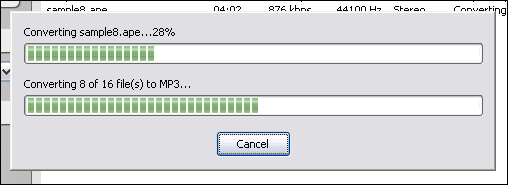
The software is converting AC3 files into MP3 format.
- Play & Browse
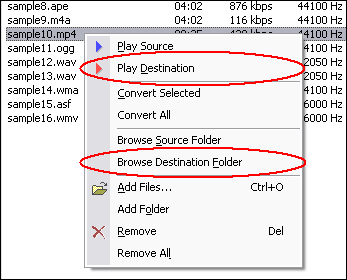
Right-click converted item and choose "Play Destination" to play
the destination file, choose "Browse Destination Folder" to open
Windows Explorer to browse the destination file.
- Done
Top
What is AC3?
Dolby Digital, or AC-3, is the common version containing up to six discrete channels
of sound. The most elaborate mode in common usage involves five channels for normal-range
speakers (20 Hz ¨C 20,000 Hz) (right front, center, left front, right rear
and left rear) and one channel (20 Hz ¨C 120 Hz) for the subwoofer driven
low-frequency effects. Mono and stereo modes are also supported. AC-3 supports
audio sample-rates up to 48kHz. Batman Returns was the first film to use Dolby
Digital technology when it premiered in theaters in Summer 1992. The LaserDisc
version of Clear and Present Danger featured the first Home theater Dolby Digital
mix in 1995.
What is MP3?
MPEG-1 Audio Layer 3, more commonly referred to as MP3, is a digital audio encoding
format using a form of lossy data compression. It is a common audio format for
consumer audio storage, as well as a de facto standard encoding for the transfer
and playback of music on digital audio players. MP3's use of a lossy compression
algorithm is designed to greatly reduce the amount of data required to represent
the audio recording and still sound like a faithful reproduction of the original
uncompressed audio for most listeners, but is not considered high fidelity audio
by audiophiles. An MP3 file that is created using the mid-range bit rate setting
of 128 kbit/s will result in a file that is typically about 1/10th the size of
the CD file created from the original audio source. An MP3 file can also be constructed
at higher or lower bit rates, with higher or lower resulting quality. The compression
works by reducing accuracy of certain parts of sound that are deemed beyond the
auditory resolution ability of most people. This method is commonly referred to
as perceptual coding. It internally provides a representation of sound within
a short term time/frequency analysis window, by using psychoacoustic models to
discard or reduce precision of components less audible to human hearing, and recording
the remaining information in an efficient manner. This is relatively similar to
the principles used by JPEG, an image compression format.
Convert AC3 to MP3 Related Topics:
3GP to MP3,
AVI to MP3,
AAC to MP3,
AC3 to MP3,
ADX to MP3,
AMR to MP3,
APE to MP3,
AU to MP3,
CDA to MP3,
CD to MP3,
FLAC to MP3,
IT to MP3,
M4A to MP3,
MO3 to MP3,
MOD to MP3,
MP3 to AMR,
MP4 to MP3,
MPC to MP3,
MTM to MP3,
OGA to MP3,
S3M to MP3,
SND to MP3,
SPX to MP3,
TTA to MP3,
UMX to MP3,
WMA to MP3,
WV to MP3,
XM to MP3,
DTS to MP3
|